
Optum Perks: Rx Discount Card
Optum Inc.Medical
4.4426.00 Reviews
- Version
- 2.8.1 (2026080302)
- Installs
- 500.00K
- Age Rating
- Everyone
Screenshots

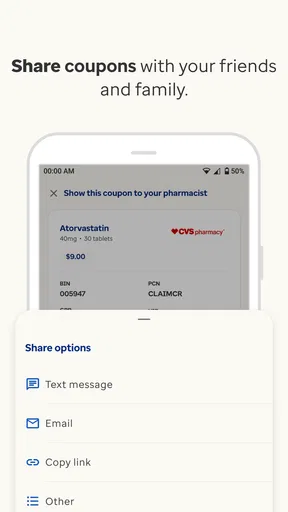
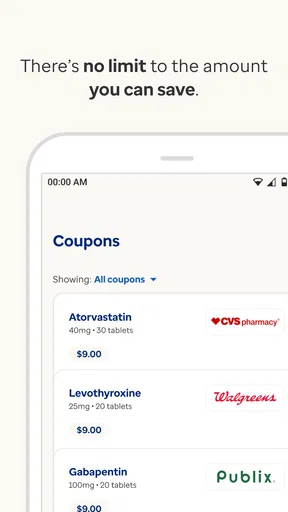
Our Review of Optum Perks: Rx Discount Card
 Analysis by Appyee
I found Optum Perks: Rx Discount Card most useful in the kind of situation where a prescription has already been written, but the price at the pharmacy still comes as an unpleasant surprise. It is a free medical app from Optum Inc. that helps you look for prescription discounts at local pharmacies. I would not treat it as a replacement for a doctor, pharmacist, insurance plan, or proper medication advice. Its value is narrower and more practical: it gives you another way to check the cost before paying.
That sounds simple, but it matters in a household where more than one person handles medical errands. A partner may receive the prescription, another family member may drive to the pharmacy, and someone else may be the person who keeps track of the budget. In that shared-use scenario, the app can act as a price-checking tool rather than something that needs to become the central health record for the whole family. My overall impression is positive, especially for people who regularly compare pharmacy prices, although the usefulness depends heavily on the prescription, location, and whether the discount beats the coverage you already have.
How the app fits into a real household pharmacy trip
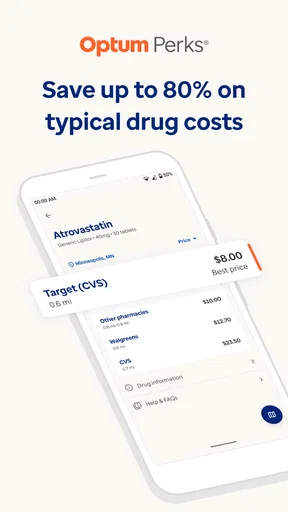
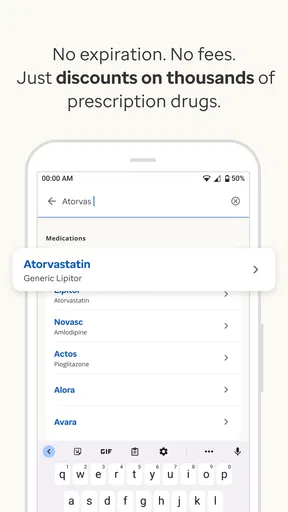
Imagine a normal weekday evening. Someone in the household has just left a clinic with a prescription, and the pharmacy counter quotes a price that is higher than expected. Instead of accepting that first amount immediately, I would open the app, search for the medication, enter the relevant details, and compare the available local options. The person who needs the medicine does not necessarily have to be the person holding the phone. A spouse, adult child, or trusted caregiver can do the search while the prescription holder confirms the medication details.
This workflow is especially helpful when the household is trying to avoid an unnecessary second trip. Before leaving home, I would check the drug name carefully, review the result for the correct strength and quantity, and note the pharmacy information shown. Then I would call or visit the selected pharmacy and ask whether the quoted discount price can be processed for that prescription. The app can make the comparison easier, but I would still regard the pharmacy as the final checkpoint.
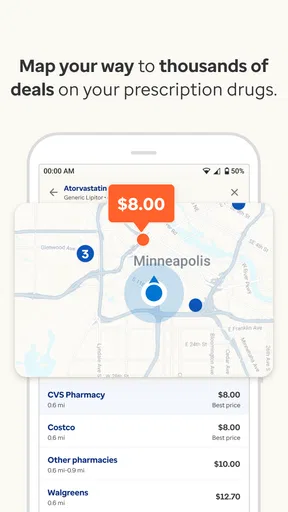
One useful habit is to search before assuming that the nearest pharmacy is the cheapest. Convenience is often worth paying for, particularly when the prescription is urgent, but a modest detour may make sense for a non-urgent refill. The important trade-off is time versus savings. A discount that looks attractive on the screen may not be worthwhile if it requires a long drive, parking costs, or a separate trip.
I also like the idea of using it as a backup when insurance leaves a medication unexpectedly expensive. That does not mean the discount will always win. Sometimes an insurance copay is lower, and sometimes a pharmacy’s regular cash price is already competitive. I would compare the options rather than automatically choosing the coupon. The app is most valuable when it gives you a second price to ask about.
What I would do before handing over the phone
Shared-device use needs a little common sense. I would avoid leaving a prescription search open if the phone is passed around casually, especially when the medication concerns a sensitive condition. The app is designed around prescription savings, but a search can still reveal private health information through the drug name. A household does not need a complicated system to handle this; simply closing the result after recording the relevant details is a sensible routine.
I would also separate the act of finding a price from the act of making a medical decision. If two people share a phone, one person might search while another interprets the result too confidently. The app can help compare costs, but it should not be used to decide whether a medicine is appropriate, whether a dose should change, or whether a prescribed treatment can be skipped. Those questions belong with a qualified healthcare professional.
For caregivers, the practical advantage is that the person doing the errand can prepare in advance. They can check the medication name, identify a nearby pharmacy, and discuss the price with the prescription holder before traveling. That reduces confusion at the counter. It also avoids treating the app as though it were a shared medical chart, which it is not.
Setting it up without blurring household boundaries
The app is free, which makes it easy to try without committing money upfront. It is rated for Everyone, and its minimum operating requirement is Android 6.0 or later. On a compatible phone, I would start by deciding who is actually going to use it: the prescription holder, a caregiver, or several adults taking turns. That decision is less about the installation itself and more about keeping responsibility clear.
For a single adult, the arrangement is straightforward. The user searches when needed and presents the relevant discount information at the pharmacy. In a shared household, I would not assume that one person’s search history or saved details should automatically stand in for everyone else. Each adult should know which prescription is being checked and who is responsible for confirming the final price.
This boundary becomes important when several family members take different medicines. A search for one person’s prescription can sit beside another person’s search, making it easy to select the wrong result in a hurry. My practical tip is to handle one prescription at a time, write down the medication details separately, and close the result before starting the next search. That small pause is more reliable than trusting memory at a busy pharmacy counter.
I would also keep the prescription container or the written instructions nearby while searching. Drug names can be similar, and choosing a result based only on a partial name is a poor shortcut. Strength, form, and quantity can affect the displayed price. If the information on the prescription and the information entered into the app do not match exactly, I would stop and verify rather than treating the lowest number as the correct one.
The current version is 2.8.1, identified in the app information by a longer build number as well. That is useful when checking whether the installed app is current, particularly on an older household phone. Still, a version number does not guarantee that every search will be equally useful in every location. Pharmacy availability and local pricing remain practical factors outside the app’s control.
Coordination is useful, but it is not the same as shared management
One of the app’s strongest household uses is coordination before the pharmacy visit. I would send the person running the errand the medication name, the intended pharmacy, and the price information found during the search. If the medicine is for another adult, I would ask that person to confirm the details before the purchase. This creates a simple handoff without pretending that the app manages the family’s prescriptions for you.
That distinction matters for larger households. A shared phone can help with a one-off purchase, but it is not necessarily the best long-term system for organizing every refill, appointment, and medication instruction. Someone who needs comprehensive medication management may be better served by a dedicated health-record or medication-reminder solution, while using this app only for the cost-comparison part of the task.
Another practical tip is to check the price again when a prescription changes. If a doctor changes the strength, quantity, or form of a medicine, an old search should not be treated as current. The household member who usually handles errands may remember the previous price and assume it still applies. I would begin a fresh search for the changed prescription, then confirm the result with the pharmacy.
There is also a useful distinction between an urgent first fill and a routine refill. For an urgent medicine, I would prioritize getting the correct prescription promptly and ask the pharmacy whether the discount can be applied without delaying treatment. For a routine refill, I would have more time to compare nearby options. That is where the app’s local discount focus becomes more practical, because planning can turn a quick price check into a deliberate choice.
People often want to know whether a discount card should be used alongside insurance. I would not assume that it can simply be stacked with every plan or pharmacy offer. Instead, I would ask the pharmacist to compare the available methods and explain which price applies. The sensible approach is to present the option, listen to the pharmacy’s answer, and choose the lower legitimate price for that prescription.
Age, trust, and responsible use
The Everyone age rating makes the app approachable for households with different generations using the same device, but age suitability is not the same as medical independence. A teenager might be able to operate the search screen, yet an adult should still confirm the prescription and the purchase. An older relative may appreciate help with the phone while remaining the person who decides what information is shared and where the medicine is collected.
I would be particularly careful when one person searches on behalf of another adult. The helper should have permission to handle the prescription details, and the prescription holder should be included in the final decision. This is a trust issue rather than a technical feature. A discount is not worth creating confusion about who authorized the purchase or who will take responsibility for checking the medication.
For an elderly family member, the best use may be collaborative: sit together, read the prescription label aloud, search carefully, and call the pharmacy if anything looks unclear. That approach reduces the risk of a helper entering the wrong drug or assuming that a similar name means the same medicine. The app can support the conversation, but it should not replace it.
I also would not use a shared family phone as a reason to expose every prescription to every household member. Health information deserves the same basic privacy consideration as financial information. If several adults use the device, each person should be able to decide when a search is performed and who sees the result. Closing the app after use and avoiding casual screenshots are simple ways to keep the process more discreet.
The developer, Optum Inc., gives the app a recognizable healthcare context, but I still judge it by its practical behavior rather than by the developer name alone. A medical discount tool should be treated carefully: check the medication, check the pharmacy, and ask questions when the result does not line up with the prescription or the price at the counter.
Where it beats the usual alternatives, and where it does not
The usual alternative is to accept the pharmacy’s first quoted price or call several pharmacies manually. The app is more convenient than making repeated calls when you only need an initial comparison. It gives a household member a structured place to begin, which is useful when the prescription has just been issued and nobody knows whether the price is normal.
Compared with relying only on insurance, it offers another angle for people whose copay is high or who are paying without coverage. But it is not automatically better than insurance. A person with a strong prescription plan may find that the insured price is already the best option, and a person with a narrow network may need to prioritize an approved pharmacy. In those cases, the app is a comparison tool, not the deciding authority.
Compared with a full medication-management app, its purpose is much narrower. It is not the choice I would make for reminders, dosage schedules, symptom tracking, or a consolidated family health profile. Its strength is the immediate financial question: can I find a more affordable way to fill this prescription at a local pharmacy? Keeping that scope in mind prevents disappointment.
One limitation is that a displayed discount does not remove the need for confirmation. Pharmacy systems can have their own procedures, and the price may depend on the exact prescription details. I would never arrive with only a remembered number and assume the transaction must match it. I would show the relevant information, ask the pharmacist to process it, and be prepared for the final amount to differ.
Another limitation is that the app’s usefulness is uneven across medications and locations. If the local result is not meaningfully cheaper, the search has still taken time without producing a worthwhile benefit. That is not a reason to dismiss the app; it is a reason to use it selectively. I would check it when the prescription is expensive, when insurance coverage is unclear, or when comparing pharmacies is realistic.
My household verdict after using it
Optum Perks: Rx Discount Card is a focused, free medical app that earns its place on a phone when prescription prices are a recurring concern. It has a 4.4 average from around 1.2 thousand ratings and has passed half a million installs, which suggests that many people find the basic idea useful. I would still judge it by the individual search, because a strong overall rating cannot guarantee savings on every medicine.
For a household, I recommend using it as a shared errand aid with clear boundaries. Let one person search, let the prescription holder confirm the details, and let the pharmacist verify the final price. That workflow makes the app helpful without turning a shared device into an uncontrolled store of everyone’s medical information.
I would recommend it most strongly to people who pay cash, face unexpectedly high copays, help relatives with pharmacy trips, or want a quick alternative before accepting a quoted price. I would be less enthusiastic for someone seeking a complete medication organizer or a private, multi-person health-management system. Those needs call for a different kind of app.
My final advice is simple: use it before the pharmacy trip when you have time, compare the result with insurance and the pharmacy’s own price, and confirm every detail at the counter. Used that way, it is not a promise of universal savings. It is a practical extra check that can help a household make a more informed prescription purchase.
Verdict
Strengths of Optum Perks: Rx Discount Card
- Free to use with no membership or insurance enrollment required.
- Works at many participating pharmacies across the United States.
- Can help lower prices on some generic and brand-name prescriptions.
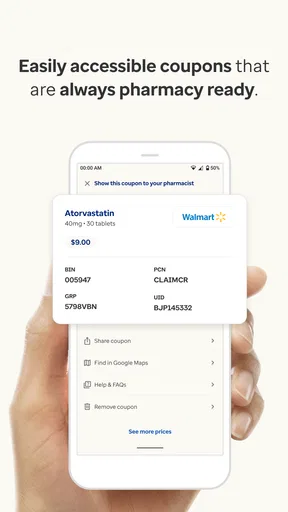
- Digital card is easy to save, show, or send to a pharmacy.
- Useful for comparing estimated medication prices before filling a prescription.
Limitations of Optum Perks: Rx Discount Card
- Savings vary widely by medication, pharmacy, location, and available offers.
- Discounts generally cannot be combined with insurance or other pharmacy deals.
- Not every prescription or pharmacy is eligible for a reduced price.
- Prices shown in the app may differ from the final amount at checkout.
- The card does not replace health insurance or provide prescription coverage.
Other Releases by Optum Inc.
View All
OptumRx
Medical4.2
Similar Picks in This Category
View All
WebMD: Symptom Checker
WebMD, LLC4.1

Microphone Amplifier
DOSA Apps4.2

Anatomy Learning - 3D Anatomy
3D Medical OU4.5

Period Tracker and Calendar
SimpleInnovation4.9

GoodRx: Prescription Coupons
GoodRx4.8

CVS Health
CVS Pharmacy4.5
Frequently Asked Questions
What is Optum Perks: Rx Discount Card, and how does it work?
Optum Perks is a prescription discount service that helps users compare medication prices and find potential savings at participating pharmacies. After searching for a medication, you can view available prices, select a pharmacy, and present the digital coupon or discount card to the pharmacist. It is not health insurance, and the final price can vary by location, medication, dosage, and pharmacy policy.
Can I use Optum Perks with health insurance or Medicare?
Optum Perks discounts are generally intended for prescriptions paid for without insurance, including situations where your insurance price is higher than the available discount price. You usually cannot combine the coupon with insurance, Medicare, or Medicaid for the same prescription. Before paying, ask the pharmacist to compare the discount price with your insurance copay so you can choose the lower eligible option.
Which pharmacies accept Optum Perks discounts?
Optum Perks works with a large network of participating pharmacies, but availability is not identical everywhere. The app or website can show participating locations and estimated prices based on the medication and selected area. Since pharmacy participation, pricing, and inventory may change, it is wise to confirm the coupon and quoted price with the pharmacy before the prescription is processed.
Can Optum Perks be used for all prescription medications?
The service supports many commonly prescribed medications, but not every drug, dosage, quantity, or treatment will have a discount available. Prices may also differ between generic and brand-name versions, and some controlled substances or restricted medications may have special limitations. Search for the exact medication, strength, and quantity in the app, then verify the result with the pharmacist.
Is Optum Perks free, and are there any important limitations?
Optum Perks is generally free for consumers to use, with no membership fee required to search for prices or access available coupons. However, discounts are not guaranteed, and the displayed amount is an estimate that may change at checkout. Coupons cannot normally be combined with other offers or insurance, and savings depend on participating pharmacies and current pricing.
